
 Launch
Project ROLES
Roles define how many people you will need on the project, what skill sets are needed and how much each role will cost, and if the revenue model is time and materials, how much revenue each role is expected to generate.

Roles are for budgeting,
allocating people and time tracking
The extremely important aspects of project roles are:
Roles estimate budget
A role uses a start, end date, and estimated hours x the internal cost and optional bill rate to estimate how much the role will cost or bring in as revenue.
Roles allocate people
Roles define your project's resource profile, how many people you will need, and what type of skill set is required.
By having a role, you can use AI to assign an actual person to fill the role.
Roles control timesheets
People can be invited to work or observe a project but only people who are assigned a role can submit timesheets (if timesheets are enabled).
Please note: For a person to be able to submit timesheets they must be assigned a role and the role's start and end dates must overlap the timesheet's dates. This way the project manager can control the period that each role submits timesheets.
Working with roles
Roles are quite easy and are created with effective defaults but have a lot of options for you to consider. Just like missionX, they can be as simple or sophisticated as you need them to be.
You can create custom roles for your project and input rates manually but it is a lot faster if you have roles created at the organization level. By creating default roles adn assigning people these roles it makes budget estimation and allocation effortless.
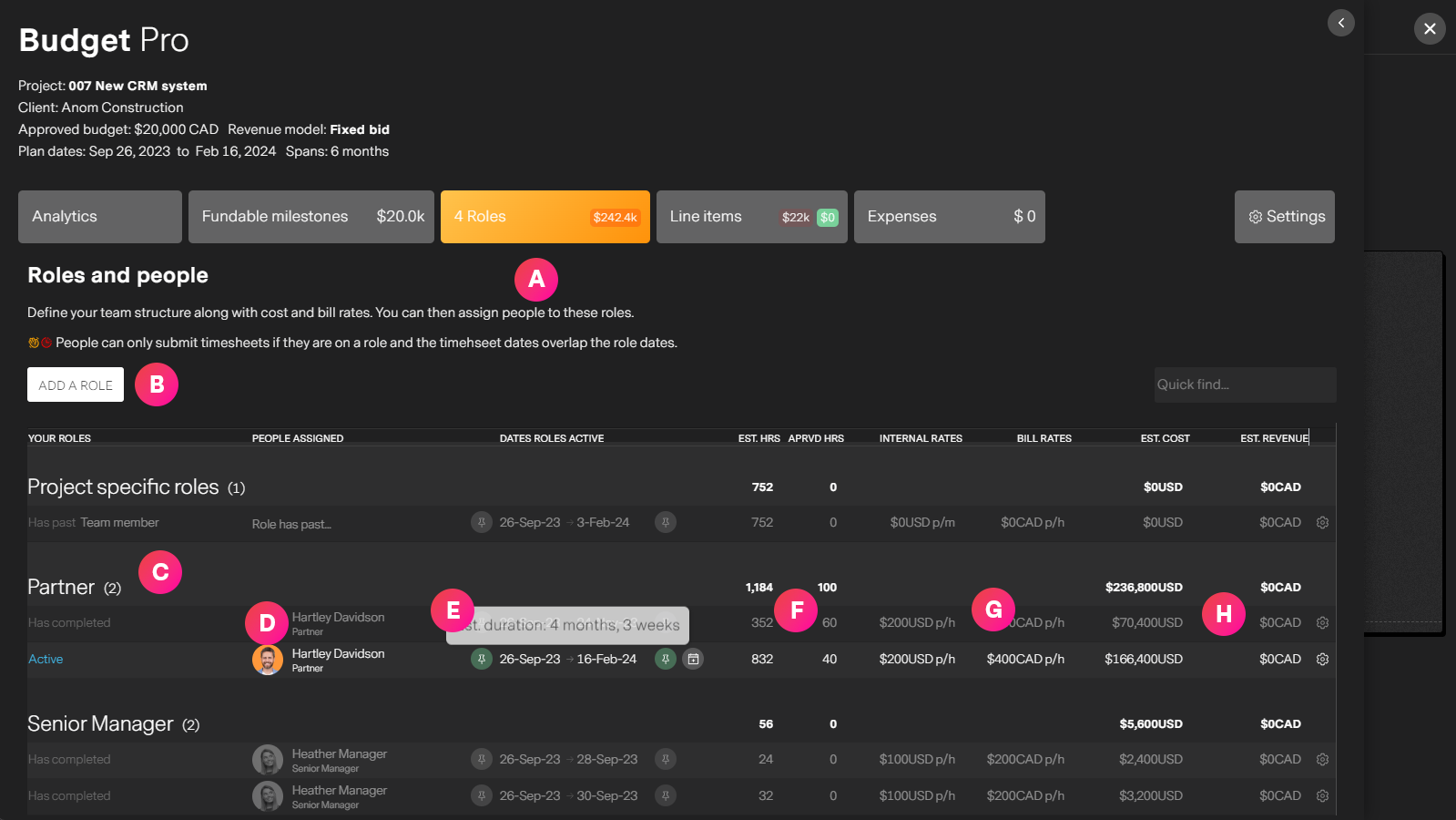
| Label | Feature | Description |
| A | The roles tab | Access roles from Budget Pro |
| B | Create a role | You can add roles by selecting from existing organization roles or custom project roles. Examples: 1 x Senior manager, 2 Junior Designers, 3 Engineers... etc |
| C | Role details | Roles are grouped by the role name. Each group header shows aggregate information like number of roles in the group, total hours and costs. The forst cell of each role will tell you that status. Each role can be: Active, Completed, Disabled, Past and unfilled |
| D | Filling roles | Roles serve no purpose unless you assign a person to them. When you are ready to assign a person missionX provides you a list of AI vetted recommendations for you to assign the best person to the role. Please see project resource allocation for more details |
| E | Role dates | Role dates define how long this role is active on the project. By default roles are "pinned" to the entire project, so that as project dates change, so do the roles dates. This way your budget is always up-to-date. Role dates can be set manually, or pinned to the project start, end, both or neither. If a date is not pinned, missionX will not automatically update the budget or role dates. Splitting role duration can be accomplished by clicking the calendar icon next to the dates. For example, if you need a Design for 1 week at the begining of the project and 2 weeks near the end, simply split the role and adjust the dates as you wish. |
| F | Estimated vs Actual hours | Estimated hours can be entered manually or are calculated based on available business hours for the nduration of the role. For example: You can have a role with a 1 week duration but only estimate 16 hours (2 days) of work. If you did not estimate 16 hours by default the estimated hours would be 40. Actual, or "Approved" hours are the approved timesheet hours for this role. This is a powerful way to track overruns across the platform. |
| G | Rates | Rates include internal cost and bill rates. These are inherited from organization roles and can be overridden or removed by the project manager. If a person is assigned a role at the organization level, then that is the internal cost and cannot be changed. This makes sure project costs are more accurate, especially if a junior person, with a junior role is assigned to a more senior level position on the project. This will then show greater profitability. Bill rates can be adjusted as needed if the project is billable. This is important especially if different clients have negotiated different rates for the same role. |
| H | Cost and Revenue | The total estimated cost and revenue of the role calculated based on duration and rates. |