
 Launch
Invoicing expenses
A quick example showing how easy it is to include expenses in invoices.
In this example, we are going to invoice a single expense, but usually you can submit many expenses along with other billable items like, hours or line-items. For more details after this example check out invoicing.
Please see expense configurations to define how tips and taxes are invoiced.
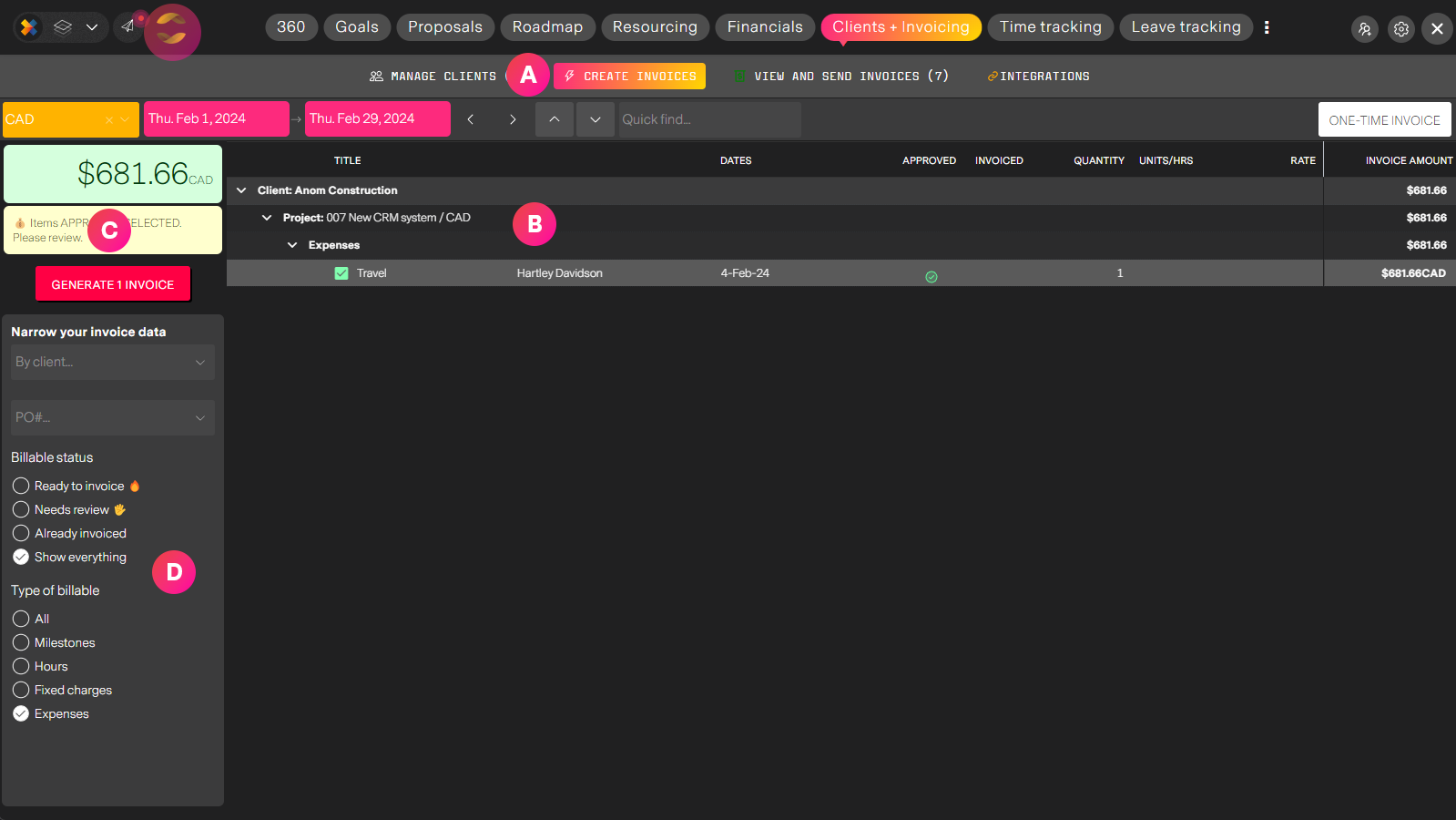
| Label | Feature | Description |
| A | Create invoice tab | From Clients and Invoicing in the Organization workspace select the "Create invoices" tab to generate invoices from project data. |
| B | Invoicable items | An automated list of invoicable items that match your filter criteria, dates, currency, type of invoicable items. Here we see just one item (the expense we want to invoice) and it is preselected for us ready to invoice. |
| C | Generate invoices | This will generate your invoice or invoices, ready for review and finalization. |
| D | Refine your view | A quick an easy way to refine your view based on type of item to invoice (hours, milestones, line-items, expenses) and status (ready to invoice, needs approval etc..) Here we have selected to see only "Expenses" |
View the invoice
Here is the example invoice we created.
Invoices in detail
Learn more about invoicing in missionX... or just try it, it's pretty easy.