
 Launch
Setup time tracking for your Organization
Timetracking is available and ready-to-use right out-of-the-box for Unlimited subscribers but there are a few configuration options for you to consider.

Configure time tracking
Time tracking in missionX is extremly fast, simple and automatically tied into reporting and invoicing saving you a ton of time and headaches.
The default settings should be enough for most companies but the system offers some flexible settings to accommodate different needs.
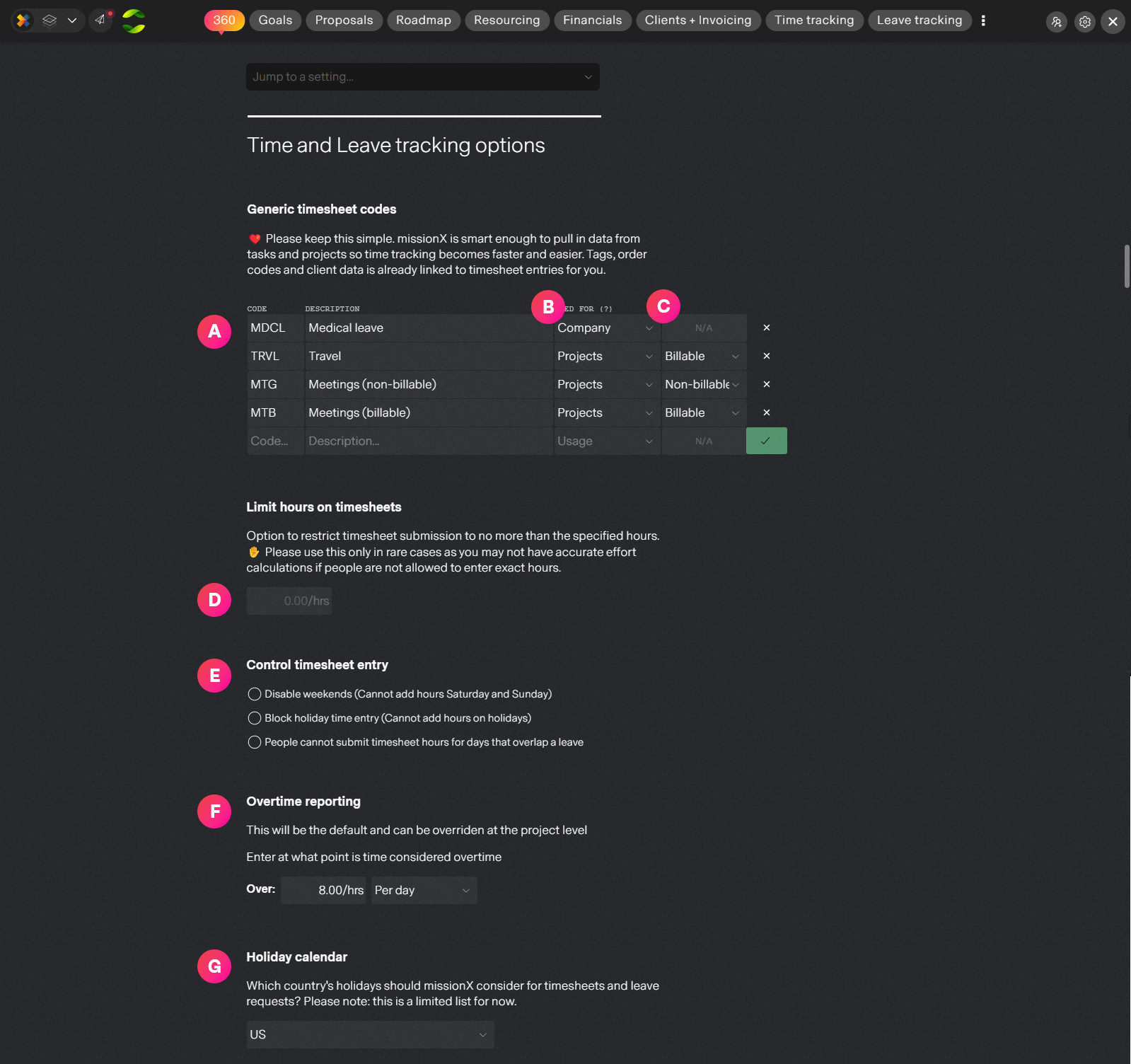
| Label | Feature | Description |
| A | Time entry codes and descriptions | missionX starts off with some basic generic timesheet codes that you can replace or delete. These will be available when people submit timesheets. The description is what people will see in the timesheet entry drop down. |
| B | Company or project code | There are two types of timesheets that can be submitted in missionX: project and company. Project codes can only be used for project timesheets and are approved by project managers like "Meetings" or "Travel" while company codes like "Medical" are used for company timesheets which are approved by an authorized organization approver. |
| C | Billable codes | If you define a project code as "Billable", then hours submitted against this code will be automatically available for invoicing on billable time and material projects. |
| D | Limit timesheet hours | This will allow you to restrict total hours to a certain number per day or per week. For example: Limit total hours per week to 40. Please use this only if really needed otherwise you will not be getting realistic analytics around profitability and ROI. |
| E | Restrict time entry options | Optional. Define what dates should be disabled. - Disable weekends on timesheets - Disable holidays (For certain countries. See G below) - Disable timesheet days that overlap holidays |
| F | Overtime defaults | missionX automatically calculates and reports on overtime hours. Set the default working hours per day or week, overtime will be calculated as hours over this period. This can be overridden at the project level. |
| G | Holiday calendar | Specify which country's holidays to use for timesheets and leaves. This is limited to a few countries for now but it is rapidly expanding. If your country is not yet included please just create a "Holiday" code to submit time against. |
Next step
Now that we have things setup as we like let's submit some timesheets.